Do Hashtags Work On Pinterest?
Short History Of Pinterest
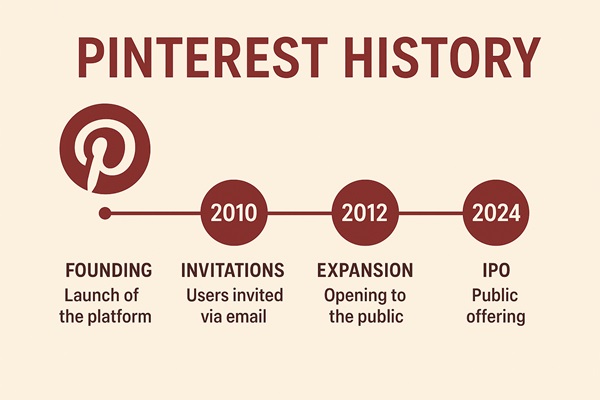
The history of Pinterest is a unique journey of visual discovery, creativity, and inspiration in the digital age. Pinterest was founded in December 2009 by Ben Silbermann, Paul Sciarra, and Evan Sharp. The platform officially launched as a closed beta in March 2010, and it quickly gained traction among users who wanted a way to visually organize and share ideas. Unlike traditional social networks focused on status updates or messaging, Pinterest was designed as a virtual pinboard—a place to “pin” images and links related to interests like fashion, food, travel, home decor, and DIY projects.
In 2012, Pinterest launched its mobile app, which significantly boosted user engagement and accessibility. Around the same time, it introduced business accounts, allowing brands to create curated boards and connect with audiences through visual storytelling.
Over the years, Pinterest evolved from a simple image-sharing platform into a powerful search and discovery engine. It introduced features like:
- Rich Pins (2013), which include extra information like recipes, product details, or article headlines.
- Promoted Pins (2014), enabling advertisers to reach users with targeted visual ads.
- Visual Search (2017), allowing users to search for items within images using AI.
- Shopping features, making Pinterest a hub for e-commerce and product discovery.
A Big Change In Pinterest
Pinterest also focused on personalization and inclusivity, adding tools for skin tone filtering in beauty searches and expanding its algorithm to reflect diverse interests and communities.
In 2019, Pinterest went public with an IPO, further solidifying its role as a major player in the tech and social media space. Despite competition from platforms like Instagram and TikTok, Pinterest maintained its niche by focusing on intent-driven content—users come to Pinterest not just to browse, but to plan, learn, and take action.
Today, Pinterest has hundreds of millions of active users worldwide and continues to be a go-to platform for inspiration, creativity, and visual search. It’s used by individuals, creators, and businesses alike to explore ideas, promote products, and build communities around shared interests.
How Does Pinterest Explore Works?
🔍 Core Functionality of Pinterest Explore
Personalized Discovery: Pinterest Explore uses algorithms to analyze your behavior—such as the Pins you save, boards you create, and searches you perform—to curate a feed of content tailored to your interests.
Trending Topics: The Explore tab (when available in your region) highlights what’s currently popular on Pinterest. This includes seasonal ideas, viral trends, and emerging topics across categories like fashion, food, home decor, and more
Search Integration: When you tap the search bar, Pinterest suggests trending topics and ideas based on your recent activity. You can also use Guided Search to refine results (e.g., typing “home remodeling” will show subtopics like “living room designs”)
Visual Search & Pinterest Lens: You can use Pinterest Lens (especially on mobile) to take a photo of something and discover related Pins. This is part of Pinterest’s broader visual discovery system.
Action-Oriented Browsing: Users on Pinterest are typically looking to take action—whether it’s planning a project, shopping, or learning something new. Explore helps surface content that aligns with these intentions.
📈 For Creators & Marketers
- Content Visibility: Pins featured in Explore are more likely to be seen by users actively searching for inspiration, increasing engagement and conversions.
- Trend Leveraging: By aligning content with trending topics shown in Explore, creators can boost visibility and relevance.
- Analytics: Pinterest provides tools to measure how well your content performs in Explore, including metrics like saves, clicks, and impressions.
⚠️ Regional Availability
The Explore tab may not be available in all regions. In such cases, Pinterest still offers discovery features through the Home feed, Today tab, and search suggestions.
The Importance Of Hashtags For Pinterest Marketing

Pinterest is one of the most powerful platforms for driving long-term traffic, especially for content creators, bloggers, and e-commerce brands. While visual appeal and keywords play a crucial role, hashtags can be the secret weapon that boosts your content discoverability and search ranking.
Do Hashtags Work on Pinterest?
Yes! Hashtags on Pinterest function like keywords. When you add hashtags to a pin description, they help Pinterest categorize and show your content in relevant searches. Unlike other platforms, Pinterest prioritizes both hashtags and keywords—using them together gives you the best chance of getting discovered.
Why Are Hashtags Important on Pinterest?
- Enhanced Search Visibility: Hashtags make your pins searchable by specific
themes and trends. - Content Discovery: Users looking for specific topics can find your pins via
hashtags in real-time. - Increased Traffic: Well-optimized hashtags can increase the longevity and
reach of your content. - Trend Alignment: Using trending Pinterest hashtags can help you tap into
what’s popular now. - SEO Boost: Hashtags act as metadata, improving how your pins are indexed
both on Pinterest and on search engines like Google.
✅ How Hashtags Work On Pinterest
- Clickable (sometimes): On mobile, hashtags in Pin descriptions may be clickable and lead to search results for that term. On desktop, they’re often not clickable.
- Function as Keywords: Pinterest treats hashtags more like supplementary keywords than true hashtag feeds. They help categorize content but don’t create separate hashtag pages like on Instagram.
- Search Behavior: Users rarely search using hashtags (e.g., typing
#FreeHashTag). Instead, they search using plain keywords like “Free Hashtag Generator”.
📌 Best Practices for Using Hashtags
Do:
- Use 2–5 relevant hashtags per Pin.
- Place them at the end of your Pin description.
- Choose specific, searchable hashtags (e.g.,
#HealthyMealPrep, not#Food). - Use branded, niche, or seasonal hashtags when relevant.
Don’t:
- Overuse hashtags (avoid 20+ per Pin—it looks spammy).
- Use generic or vague hashtags like
#Loveor#Fun. - Add hashtags to comments—they don’t work there.
⚠️ Limitations & Cautions
- Visibility: Pin descriptions are often truncated, hiding hashtags unless users click “More”.
- Spam Risk: Excessive or irrelevant hashtag use can be flagged as spammy behavior.
- Short-Term Impact: Hashtags may boost visibility briefly after posting, but long-term success depends on content quality and keyword optimization.
🧠 Strategic Use Cases
- Trending Topics: Use hashtags like
#BackToSchoolor#HalloweenDecorduring seasonal peaks.
- Brand Campaigns: Create a unique branded hashtag to track engagement.
- Niche Targeting: Reach specific audiences with hashtags like
#GermanSkincareor#MinimalistDesign.
🔍 Final Verdict
Hashtags on Pinterest are optional and should be used sparingly and strategically. Focus more on strong keywords, engaging visuals, and optimized descriptions—those are the real drivers of Pinterest success.
Best Practices for Using Pinterest Hashtags
- Use 2 to 5 relevant hashtags per pin description.
- Focus on specific, niche hashtags (e.g.,
#FallHomeDecorinstead of#Decor). - Combine hashtags with strong keywords in your descriptions.
- Avoid spammy or unrelated hashtags that could hurt your visibility.
- Use a Pinterest hashtag generator to find high-performing tags.
Why Use an AI Hashtag Generator for Pinterest?
Coming up with the right hashtags for each pin can be time-consuming. An AI-powered hashtag tool like FreeHashtag.com analyzes your content and provides:
- Popular and trending hashtags relevant to your niche
- SEO-friendly suggestions for better visibility
- Real-time optimization based on Pinterest trends
It’s the smartest way to automate your Pinterest strategy and maximize reach with minimal effort.
Conclusion
If you want your content to stand out on Pinterest and drive consistent traffic, don’t ignore the power of hashtags. They improve your content’s discoverability, align you with trending topics, and give you an edge in Pinterest’s visual search engine.
Start using optimized hashtags with FreeHashtag.com and grow your Pinterest visibility faster.